The translator app for actual conversations.

Click AI helps you write messages in a second language that sound local instead of awkward formal translations.📍

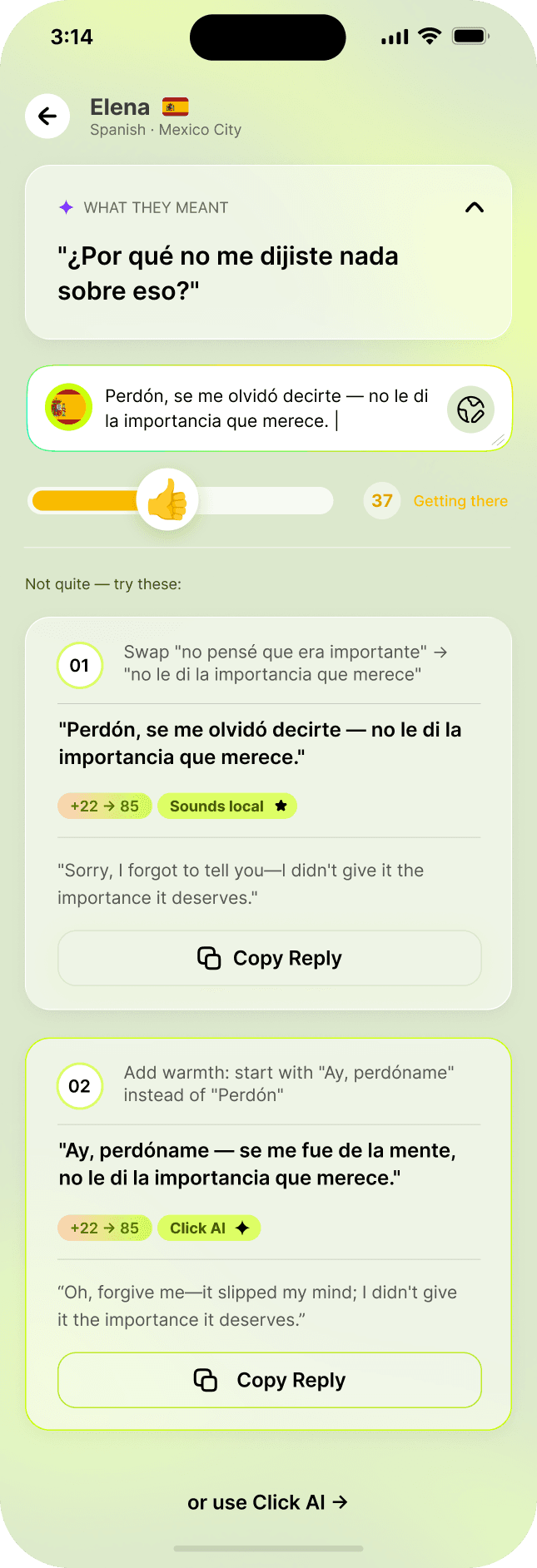
Click AI app screen showing message analysis and reply suggestions

Llegué bien, no te preocupes

AI suggestion

She’s letting you know she made it home and keeping you updated.

Me alegro 😊 Descansa, hablamos mañana.

Sounds local

The translator app for actual conversations.

Click AI helps you write messages in a second language that sound local instead of awkward formal translations📍

Click AI app screen showing message analysis and reply suggestions

Sounds local

The translator app for actual conversations.

Click AI helps you write messages in a second language that sound local instead of awkward formal translations.📍

Click AI app screen showing message analysis and reply suggestions

Sounds local

Read the subtext

Reply like a local

Choose your tone

Learn what clicks

Read the subtext

Reply like a local

Choose your tone

Learn what clicks

Read the subtext

Reply like a local

Choose your tone

Learn what clicks

See how it works

See how it works

Understand their message.

Understand their message.

See the translation and local context before you reply.

Say it naturally.

Say it naturally.

Write in English, then choose a version that fits their dialect.

Sound local. Build connection.

Sound local. Build connection.

Sound local. Build connection.

Get natural replies that fit their dialect and help you connect.

Check before you send.

Check before you send.

Get feedback on your draft and a suggested improvement.

See demos & plans

Built for a reply that clicks.

See how the messaging workflow compares.

CapabilityGoogle TranslateDeepLApple TranslateClick AI
Local context & wordingUnderstand / Ask*AlternativesDictionaryDialect context
Suggested repliesNot listedNot listedSmart ReplyReady to use
Draft score + suggested fixNot listedWrite: rewritesWriting ToolsScore + fix
City + relationship inputsNot listedNot listedNot listedBuilt in
Dedicated translation keyboardGboard · AndroidNot listedNot listedClick keyboard

✓ Included · ↗ Separate app or system feature · ◐ Different feature · — Not listed in reviewed docs.

All four translate written text. Comparison checked November 11, 2026. Availability varies by language, device, region and plan.

Sources & comparison notes

Not listed means not found in official docs reviewed, not proof a feature is unavailable.

Google Understand/Ask launch was announced for US/India on iOS/Android.

DeepL Write and Apple Writing Tools improve drafts; a numeric score is not listed.

Smart Reply is in Apple Messages/Mail, Writing Tools is a separate OS feature, and Gboard is a separate Android keyboard.

Apple selected-text translation and Messages Live Translation, Google Tap to Translate on Android, and sharing selected text to DeepL are also available; the dedicated-keyboard row does not claim those products cannot help within messaging.

No speed or accuracy superiority is claimed.

Less switching. More understanding.

Less switching. More understanding.

Less switching. More understanding.

Keep your reply in the chat.

Write in English, choose a local reply and tap Use it, all inside the Click AI keyboard.

Context changes the result.

A 2026 chat-translation study reported fewer context-related errors in 9 of 12 test settings when its system used context-aware scoring.

Slang needs context.

Adding a second usage example improved slang-meaning identification by 26.3 percentage points on average in a 2026 synthetic benchmark.

Research scope: TACL—customer-support and assistant chats, automated scoring. WMT—1,087 synthetic slang items across 10 models in Chinese, Russian and Farsi, AI-judged. Neither study tested Click AI.

Built for conversations across languages 🌎

Date, flirt, and connect more naturally across cultures.

  • 🇲🇽 Spanish

  • 🇫🇷 French

  • 🇮🇹 Italian

  • 🇵🇹 Portuguese

  • 🇩🇪 German

  • 🇯🇵 Japanese

  • 🇰🇷 Korean

  • + more

Built for conversations across languages 🌎

Date, flirt, and connect more naturally across cultures.

  • 🇲🇽 Spanish

  • 🇫🇷 French

  • 🇮🇹 Italian

  • 🇵🇹 Portuguese

  • 🇩🇪 German

  • 🇯🇵 Japanese

  • 🇰🇷 Korean

  • + more

Built for conversations across languages 🌎

Date, flirt, and connect more naturally across cultures.

  • 🇲🇽 Spanish

  • 🇫🇷 French

  • 🇮🇹 Italian

  • 🇵🇹 Portuguese

  • 🇩🇪 German

  • 🇯🇵 Japanese

  • 🇰🇷 Korean

  • + more

YOUR CONVERSATIONS MATTER

Designed with privacy in mind.

Messages are used for your analysis.

Screenshots are processed for text.

Delete your data anytime.

Read the Privacy Policy for the full details.

Read our Privacy Policy

YOUR CONVERSATIONS MATTER

Designed with privacy in mind.

Messages are used for your analysis.

Screenshots are processed for text.

Delete your data anytime.

Read the Privacy Policy for the full details.

Read our Privacy Policy

YOUR CONVERSATIONS MATTER

Designed with privacy in mind.

Messages are used for your analysis.

Screenshots are processed for text.

Delete your data anytime.

Read the Privacy Policy for the full details.

Read our Privacy Policy

HELP & SUPPORT

We’re here if you need us.

Questions or account help? Email us.

Email Click AI Support

How does Click AI work?

Can Click AI read screenshots?

Are AI interpretations always accurate?

How do I cancel my subscription?

How do I restore a purchase?

How do I delete my data?

Who can use Click AI?

HELP & SUPPORT

We’re here if you need us.

Questions or account help? Email us.

Email Click AI Support

How does Click AI work?

Can Click AI read screenshots?

Are AI interpretations always accurate?

How do I cancel my subscription?

How do I restore a purchase?

How do I delete my data?

Who can use Click AI?

HELP & SUPPORT

We’re here if you need us.

Questions or account help? Email us.

Email Click AI Support

How does Click AI work?

Can Click AI read screenshots?

Are AI interpretations always accurate?

How do I cancel my subscription?

How do I restore a purchase?

How do I delete my data?

Who can use Click AI?

Say what you mean. Make sure it clicks.

Download on the App Store
Get it on Google Play

Say what you mean. Make sure it clicks.

Download on the App Store
Get it on Google Play

Say what you mean. Make sure it clicks.

Download on the App Store
Get it on Google Play